
Introduction
A laptop sleeve or case may look like a simple accessory, but the right one can make daily carrying easier, help protect your device from scuffs and bumps, and keep your work setup more organized. The wrong one, on the other hand, can be frustrating from the first use: too loose, too bulky, awkward to carry, or lacking the level of protection you actually need.
If you are shopping for a new sleeve or case, the best choice depends on how you use your laptop, where you take it, and what kind of protection matters most to you. A student who carries a laptop between classes may want something slim and easy to slide into a backpack. A commuter may prefer a sleeve with a handle or water-resistant build. Someone who travels often may care more about padding, corner protection, and storage for small accessories.
This guide breaks down the key things to look for before buying so you can compare options with confidence. It focuses on practical features, common mistakes, and the trade-offs that matter most when choosing between laptop sleeves and cases.
What a Laptop Sleeve or Case Is Meant to Do
Before comparing materials or styles, it helps to define the main job of a laptop sleeve or case. In most situations, it serves as a layer of protection around your device when it is being carried, stored, or packed inside a larger bag. It may also help separate the laptop from keys, chargers, notebooks, and other items that can cause scratches.
Some sleeves are designed to be used on their own as a lightweight carry option. Others are meant to work as an inner layer inside a backpack, tote, or briefcase. Laptop cases can be more structured and may offer additional protection, pockets, or handles. Knowing how you plan to use it will narrow your choices quickly.
Sleeve vs. case: the basic difference
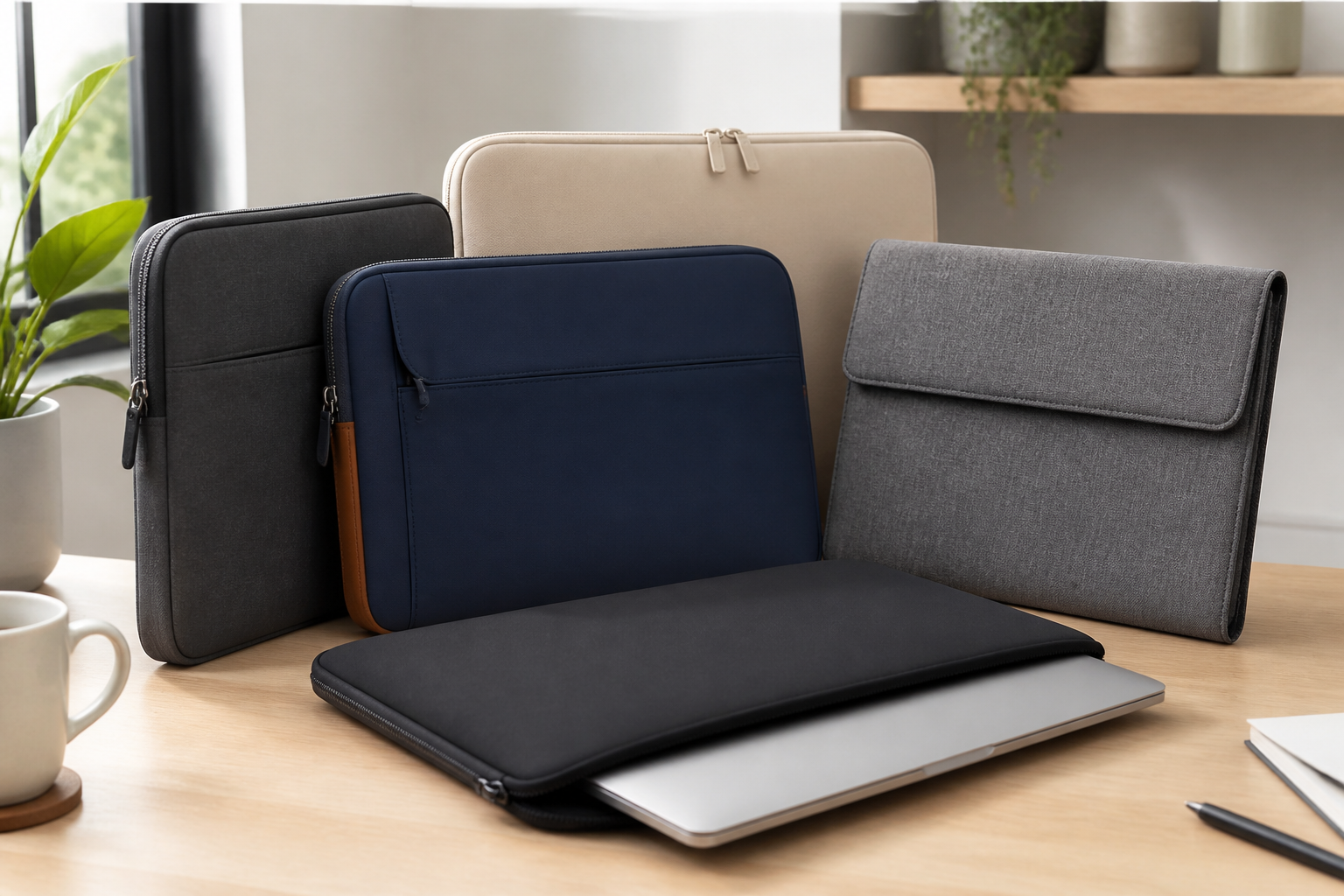
A sleeve is usually slim, soft-sided, and close-fitting. It often emphasizes portability and scratch protection. A case is more likely to be structured, padded, and built for broader everyday protection. Some cases resemble slim bags with a zipper closure and extra storage, while others are closer to hard-shell or semi-rigid protectors.
If you want something that fits inside another bag, a sleeve often makes sense. If you want more convenience and organization when carrying the laptop by itself, a case may be the better option.
Start with the Right Laptop Size and Fit
Fit is one of the most important buying factors, and it is also one of the easiest to get wrong. Laptop screens are often described by diagonal size, such as 13-inch, 14-inch, or 15.6-inch, but the actual dimensions of the laptop body matter just as much. Two laptops with the same screen size can have different widths, thicknesses, and corner shapes.
A sleeve or case that is too large may let the laptop slide around inside. That movement can reduce protection and make the fit feel sloppy. A product that is too tight may be hard to zip and may press against the device in ways that feel inconvenient, especially if you use a thicker laptop or one with a protective skin attached.
The best approach is to check the exact dimensions of your laptop and compare them with the internal measurements of the sleeve or case. If the product listing only gives screen size, look for details about compatibility with model families or body dimensions when possible.
Consider laptop thickness and accessories
Not all laptops are equally thin. Some business laptops, gaming laptops, and convertible models are noticeably thicker than standard ultrabooks. If your device has a bulky charger, stylus, mouse, or notebook that you hope to store inside the same case, you may need extra space.
However, more space is not always better. A roomy case can be convenient, but it may also allow too much shifting if you are only carrying the laptop. The most useful balance is a snug fit with just enough room for the device and the items you truly plan to carry.
Choose the Protection Level That Matches Your Routine
Protection is not one-size-fits-all. The right level depends on how often you travel, what kind of bag you use, and how much risk your laptop faces in everyday life.
Light protection for simple daily carrying
If your laptop spends most of its time inside a well-padded backpack or briefcase, a slim sleeve may be enough. This type of sleeve mainly protects against scratches, dust, and light surface contact. It is useful when you want a clean layer between the laptop and other items in your bag.
Moderate protection for commuting and class use
If you move around frequently during the day, take public transit, or carry your laptop between meetings or classes, look for thicker padding and more structure. A moderately padded sleeve or case can help absorb small bumps and reduce the impact of everyday handling.
Higher protection for travel or frequent movement
If your laptop is often packed, unpacked, and carried through airports, job sites, or busy environments, consider a more robust case with reinforced corners, structured panels, and a secure closure. This does not make it indestructible, but it may offer more confidence than a very thin sleeve.
Think of protection as a match for your lifestyle rather than as a universal upgrade. More protection usually means more bulk, and more bulk can reduce portability. The best choice is the one that balances both.
Look Closely at the Materials
Materials affect how a sleeve or case feels, how much protection it provides, and how long it may hold up to regular use. The outer material and inner lining both matter.
Common outer materials
- Neoprene: Flexible, lightweight, and often water-resistant to a degree. It is commonly used for slim sleeves.
- Nylon or polyester: Durable and widely used. These materials can be lightweight and practical, especially when paired with padding.
- Faux leather or leather: Often chosen for a more polished appearance. These materials can work well for office use, though the feel and maintenance requirements vary.
- Hard shell materials: Used in more protective cases. They can offer structure but may be less flexible and sometimes heavier.
Inner lining matters more than many buyers realize
A soft interior lining helps reduce the chance of scratches when you insert or remove the laptop. Microfiber, felt-like linings, and other soft finishes are common. If you often place your laptop in and out of the sleeve throughout the day, a smooth interior can make the process easier and reduce wear on the device’s finish.
Weather resistance and everyday spills
Many shoppers want a sleeve or case that can handle small spills or brief exposure to light rain. Water-resistant materials can help, but they are not the same as full waterproof protection. It is better to think in terms of resistance, not invincibility. If you often walk in unpredictable weather, a water-resistant exterior and a secure zipper closure are worth prioritizing.
Decide How Much Portability You Actually Need
Some laptop sleeves are designed to disappear inside a larger bag. Others are intended to be carried on their own. The more you think about how you move through your day, the easier it becomes to choose the right format.
Slim and lightweight
A slim sleeve is best if you want minimal bulk and already have a backpack or tote that works well. This is a good choice for people who prioritize simplicity and prefer not to carry extra handles, straps, or pockets.
Handle or strap options
Some cases include a top handle or detachable shoulder strap. These features can be useful if you regularly carry the laptop by itself. They may also make short trips easier, such as walking from a car to a building or moving between meeting rooms. Still, added carrying features can increase size and weight.
Travel-friendly layouts
If your laptop sleeve will travel frequently, look for features that support quick access. A front pocket for cables, a secure zipper, and a shape that fits inside luggage without wasting space can all be helpful. Travelers often prefer a case that keeps essentials together without becoming overstuffed.
Check the Closure and Security Features
The way a sleeve or case closes affects both ease of use and protection. Zippers are common, but not all zippers or closures feel the same.
Zippers
A quality zipper should open smoothly and close securely without catching the fabric. A zipper that feels weak, overly stiff, or poorly aligned can become annoying over time. It may also make the sleeve harder to use in a hurry.
Flaps and magnetic closures
Some sleeves use a flap, magnetic tab, or other non-zip closure. These can be convenient and stylish, but they may not offer the same enclosure as a full zipper. They can be a good fit for low-bulk use when the sleeve is going inside another bag.
Corner and edge coverage
Because corners often take the brunt of accidental bumps, it is worth checking whether the design provides extra reinforcement in these areas. A sleeve that looks attractive but leaves the corners exposed may not be the best practical choice for heavy daily use.
Think About Storage Needs Beyond the Laptop
Some people need only a clean, protective sleeve for the device itself. Others want a small organizer that can carry a charger, cable, mouse, adapter, notebook, or stylus. Neither approach is wrong; the key is matching the product to your actual routine.
If you already carry a full bag, extra pockets may be unnecessary and can add bulk. If you prefer to travel light, a sleeve with one or two slim compartments can reduce the number of items you need to juggle. Just be careful not to overload a sleeve that was mainly designed for the laptop alone.
A common mistake is buying a case with too many storage features simply because they sound convenient. Extra pockets are useful only if they are built well and if you truly plan to use them. Otherwise, they can create a bulky shape that no longer fits well inside another bag.
Pay Attention to Build Quality and Everyday Durability
Good build quality often shows up in the details. Straight stitching, sturdy seams, smooth zippers, and even padding distribution can matter more than flashy design elements. A well-built sleeve may last longer and maintain its shape better over time.
When evaluating durability, consider how often the sleeve will be opened, closed, packed, and unpacked. If you use it multiple times a day, weak seams or thin fabric may wear out faster. If your laptop mostly stays at home and only leaves occasionally, you may not need the most rugged construction available.
Durability also depends on how much stress the sleeve experiences. A case that is frequently crushed into a crowded bag may need more structure than one that rides in a spacious backpack pocket.
Match the Style to the Setting
Appearance is not the most important factor, but it does matter, especially if you use your laptop for work or school. A sleeve or case can blend into a professional setting or stand out as a personal accessory.
Neutral colors and simple finishes tend to work well for offices, client meetings, and formal environments. More expressive materials and colors can suit students, creatives, or anyone who wants the sleeve to feel more personalized. Style should not override function, but it can help you choose a product you will actually enjoy using.
If you often carry your laptop from place to place, a polished appearance may also make the accessory feel more versatile. At the same time, it is worth remembering that lighter colors may show marks more easily than darker ones, depending on the material.
Common Buying Mistakes to Avoid
Many buyers run into the same problems when choosing a laptop sleeve or case. Avoiding these mistakes can save time and prevent disappointment.
- Buying by screen size alone: Screen size is helpful, but exact body dimensions matter more.
- Choosing a sleeve that is too loose: Extra room can lead to movement and less secure protection.
- Ignoring thickness: Some laptops, especially gaming or business models, need more depth than expected.
- Overvaluing storage pockets: Pockets are helpful only if they fit your real routine.
- Assuming water-resistant means waterproof: Light resistance is useful, but it has limits.
- Picking style before function: A sleeve that looks good but fits poorly will quickly become annoying.
- Forgetting how you will carry it: A sleeve for inside a backpack is not the same as a case for daily hand carrying.
Who Each Type May Suit Best
Best for students
Students often benefit from a lightweight sleeve or a slim case that fits in a backpack and protects against scuffs and minor bumps. If they move around campus all day, moderate padding and a secure zipper may be especially useful.
Best for office workers
For office use, a clean and professional-looking sleeve or case can be a smart choice. Many office workers prefer something slim enough to fit into a briefcase or tote, with enough structure to keep the device presentable during commutes.
Best for frequent travelers
Travelers may want a more protective design with a secure closure, water resistance, and enough room for a charger or adapter. A structured case can be more practical if the laptop is often handled separately during the day.
Best for minimalist users
If you want the lowest possible bulk, a simple sleeve with soft lining and a snug fit is usually the easiest option. This is a good match for people who already use a separate bag and do not need extra storage.
Practical Tips Before You Buy
- Measure your laptop: Compare width, depth, and thickness against the product’s internal dimensions.
- Check the closure path: Make sure the laptop can be inserted and removed comfortably.
- Think about your bag setup: If the sleeve goes into another bag, avoid unnecessary bulk.
- Review the lining: A soft interior helps reduce scratches during repeated use.
- Look at corner support: Reinforced corners can be useful for everyday commuting.
- Match the material to your habits: Choose a finish that fits your environment and maintenance preferences.
- Plan for accessories realistically: Only buy extra storage if you will actually use it.
Frequently Asked Questions
Do I need a laptop sleeve if I already have a backpack?
Not always, but it can still be useful. A sleeve adds a protective layer between the laptop and the contents of your backpack. It can also make it easier to remove the device quickly when you reach your destination.
Is a hard case better than a soft sleeve?
Not necessarily. A hard case may offer more structure, but a soft sleeve can be lighter, easier to carry, and better for everyday portability. The better option depends on how much protection you need and how you plan to transport the laptop.
Can I use the same sleeve for a different laptop later?
Sometimes, but only if the new device fits the internal dimensions and thickness allowance. Because laptop shapes vary, a sleeve that works for one model may not fit another as well as expected.
Are expensive sleeves always better?
Not always. A higher price can reflect materials, construction, or added features, but the best sleeve is the one that fits your laptop and routine well. Focus on fit, protection, and usability rather than price alone.
What if I want both a sleeve and extra storage?
Look for a case or sleeve designed with slim accessory pockets. That way you can carry essentials without sacrificing too much portability. If you already use a larger bag, though, a simple sleeve plus separate storage may be more practical.
Conclusion
The best laptop sleeve or case is the one that fits your device correctly, matches your daily routine, and provides the right balance of protection and portability. Before buying, focus on the size and thickness of your laptop, the level of padding you need, the materials used inside and out, and whether you want a simple sleeve or a more structured case.
It is easy to get distracted by style or extra pockets, but the most useful choice is usually the one that fits well and does its job quietly. If you want something slim for a backpack, choose a light sleeve with a soft lining. If you carry your laptop more often on its own, look for a case with stronger structure, secure closure, and practical storage.
With a careful comparison of fit, protection, and convenience, you can choose a laptop sleeve or case that supports your routine instead of getting in the way.


