
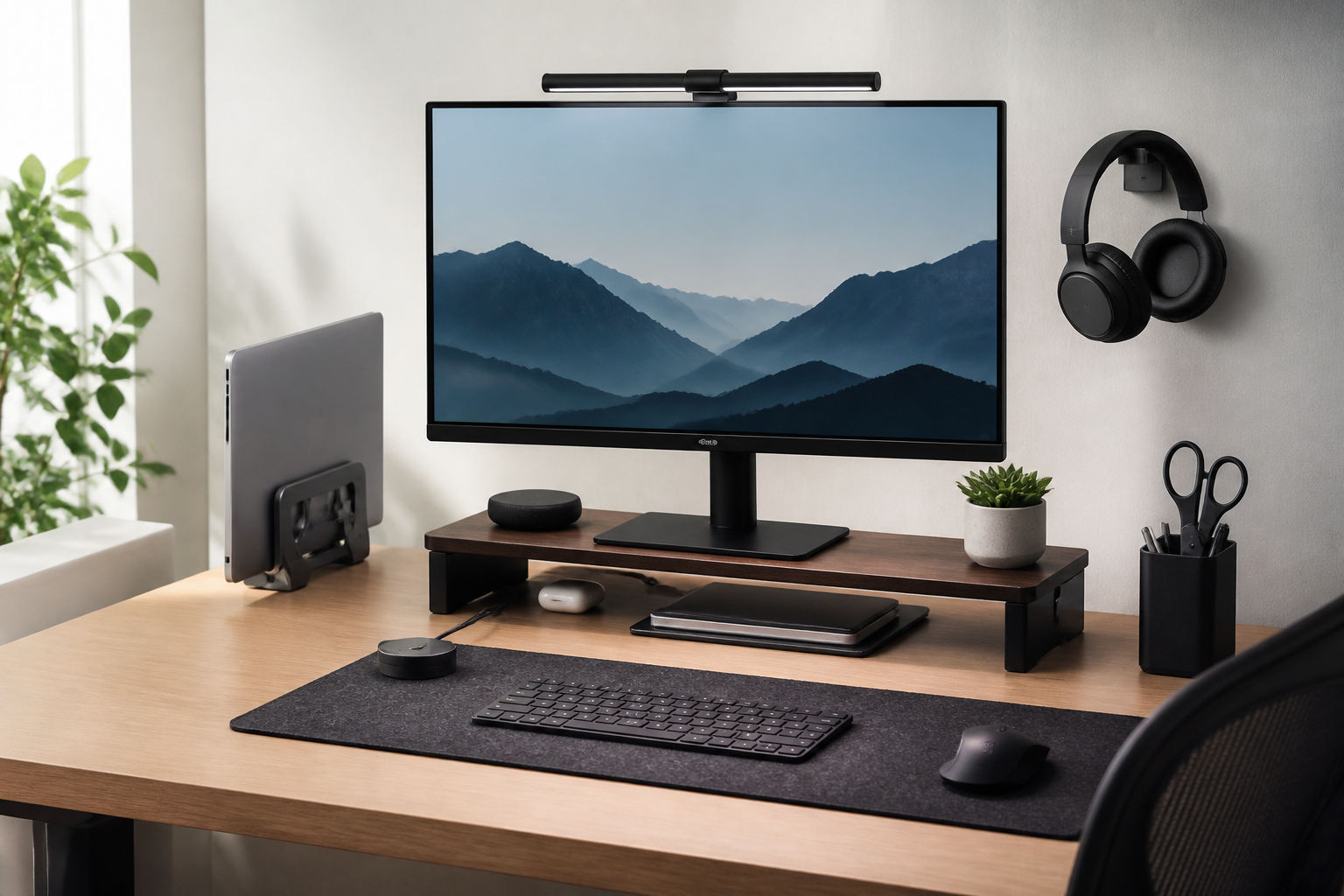
Why monitor accessories matter for a cleaner desk setup
A tidy desk is not only about looks. For many people, the space around the monitor is where clutter builds up first: loose cables, a laptop perched awkwardly beside the screen, a keyboard pushed too far forward, and small items scattered under or around the stand. The right monitor accessories can help organize that area so your workspace feels more open, easier to clean, and more comfortable to use.
When people search for the best monitor accessories for a cleaner desk setup, they are often looking for practical improvements rather than a full desk makeover. That is a smart approach. Small upgrades around the monitor can make a noticeable difference because the monitor is usually the visual center of the desk. If that area is neat, the whole workspace tends to feel more organized.
This guide focuses on useful accessories that support a cleaner, less cluttered setup. It covers what each accessory does, who it may suit, and what to consider before buying.
Monitor arms: the most effective space-saving upgrade
A monitor arm is often the single best accessory for reducing desk clutter. Instead of resting on a wide base or stand, the monitor attaches to an arm mounted on the desk or wall. That frees up surface space underneath the screen and makes it easier to position the display at a comfortable height and angle.
Why monitor arms help with clutter
Many stock monitor stands are functional but bulky. They can take up a large footprint and leave less room for a keyboard, notebook, speakers, or a dock. A monitor arm reduces that footprint and can also create a cleaner visual line across the desk because the screen appears to float above the surface.
Monitor arms may also help with cable control. Many models include channels or clips that guide cables along the arm, which helps keep power and video cords from hanging loosely.
What to look for in a monitor arm
- Compatibility: Check the monitor size, weight limits, and VESA mounting pattern before buying.
- Mount type: Clamp and grommet mounts are common. Choose based on your desk thickness and layout.
- Adjustment range: Height, tilt, swivel, and rotation adjustments make it easier to find a comfortable position.
- Build quality: A stable arm is important if you frequently adjust the monitor.
- Cable management: Built-in routing features can make the setup look much cleaner.
Who a monitor arm may suit
A monitor arm is a strong choice for people with limited desk space, dual-monitor users, and anyone who wants a more minimalist look. It can also work well for shared workspaces because it makes it easier to adjust the monitor to different sitting positions.
Monitor risers: simple, affordable, and practical
If you do not want a mounted arm, a monitor riser is another useful option. This accessory lifts the monitor above the desk surface, which can improve the viewing angle and create storage space underneath. Many risers are simple platforms, while others include drawers or shelves.
Benefits of a monitor riser
A riser can make a desk feel more organized without requiring installation. It is easy to place on the desk, and it can provide a dedicated spot for a keyboard, notebook, or small accessories when not in use. Some people prefer risers because they are straightforward and do not change the structure of the desk.
What to consider before buying
- Height: Choose a height that raises the monitor enough for a comfortable eye line.
- Width and depth: Make sure the platform fits both the monitor base and the items you want to store underneath.
- Weight support: Confirm it can safely hold your monitor or all-in-one display.
- Storage design: Drawers and shelves can help, but too many compartments may add visual clutter if you prefer a minimalist look.
Who may prefer a riser over an arm
A riser may suit renters, casual home office users, or anyone who wants a non-permanent solution. It can also be a good option for those who have a fixed monitor that does not need frequent repositioning.
Cable management tools: the hidden key to a cleaner setup
Cables are one of the biggest sources of desk clutter around a monitor. Even a very neat desk can look messy if cords hang behind the screen or spill onto the floor. Cable management accessories are not glamorous, but they make one of the biggest differences in the finished setup.
Useful cable management accessories
- Cable clips: Keep charging and device cables routed neatly along the desk edge or monitor arm.
- Cable sleeves: Group several cords together so they appear as one cleaner bundle.
- Hook-and-loop ties: Useful for bundling cables without making them difficult to remove or adjust.
- Under-desk cable trays: Help move power strips and excess cable length out of sight.
- Adhesive cable holders: Small and flexible, these can guide loose wires where you want them.
How to choose cable management that works
The best cable management is usually the kind that matches how often your setup changes. If you regularly swap devices or rearrange your desk, reusable ties and accessible clips are often more practical than tightly wrapped solutions. If your devices stay in place, a tray or sleeve may give a cleaner finish.
It is also helpful to start with a cable inventory. Many desks look cluttered because too many unused cables are visible. Removing unneeded cords is often just as important as organizing the ones you keep.
Common mistake to avoid
A frequent mistake is hiding cables in a way that makes them hard to access later. The goal is not to trap every cord permanently. It is to make the desk look tidy while keeping the setup easy to adjust, clean, and troubleshoot.
Monitor light bars and task lighting for a cleaner visual layout
Lighting does not always get discussed as a desk accessory, but it can influence how clean a workspace feels. A monitor light bar or compact task lamp can reduce the need for bulky desk lamps, leaving more surface space open.
Why these lighting options work well
Monitor light bars sit on top of the screen and direct light toward the desk without taking up room on the desktop. This can be helpful if you want a cleaner look or if your desk is already crowded with a keyboard, mouse, notebook, and accessories. A small adjustable lamp can also be a better fit than a large base lamp because it keeps the workspace open.
Things to evaluate
- Placement: Decide whether you want light from above the monitor or from the side of the desk.
- Brightness control: Adjustable settings can make the light more comfortable for different tasks.
- Desk footprint: A compact design helps preserve a clean layout.
- Screen compatibility: If choosing a monitor light bar, confirm it fits your monitor shape and thickness.
Who may benefit most
People who work in smaller rooms or shared spaces often appreciate lighting that does not take up much room. A cleaner desk appearance is easier to achieve when every item has a purpose and a compact footprint.
Laptop stands and docking accessories for hybrid workstations
Many people use a monitor alongside a laptop. In that case, the area can quickly become cluttered if the laptop is left flat on the desk without a clear purpose. A laptop stand or docking accessory can help integrate the laptop into the setup more cleanly.
How laptop stands improve the desk
A laptop stand raises the device to a more comfortable height, which can reduce visual clutter and create a more deliberate layout. If you use an external monitor, the laptop can serve as a secondary screen while sitting neatly off to the side or on a stand underneath the main display.
Some stands are vertical and designed for closed laptops. Others are angled and intended for open use. The right choice depends on whether you want the laptop visible, docked, or tucked away.
Docking accessories to consider
- USB-C docks: Can reduce cable chaos by connecting multiple devices through one hub.
- Vertical laptop stands: Free up desk space when the laptop is not the main screen.
- Dual-purpose stands: Some combine elevation with storage or cable routing.
Buying tip
Choose a laptop accessory that supports how you actually work. If you need the laptop open for video calls or reference material, a simple angled stand may be better than a vertical dock. If the laptop mostly stays connected to the monitor, a dock can reduce cable clutter significantly.
Peripheral organizers that keep the monitor area tidy
Monitor accessories are not limited to the screen itself. The objects around the monitor are part of the overall visual impression. Small organizers can keep the desk looking intentional instead of crowded.
Useful small accessories
- Headphone hooks: Keep headphones off the desktop and reduce tangled cords.
- Desk trays: Help contain pens, adapters, or small tools that would otherwise scatter.
- Controller stands: Useful for gaming setups that share space with a monitor.
- Monitor shelf add-ons: Can hold small essentials without spreading them across the desk.
How to avoid over-accessorizing
It is easy to add organizers until the desk starts to feel crowded again. A cleaner setup usually comes from restraint. Pick accessories that solve a real storage problem, and avoid buying small holders for items you rarely use. The best layout is often the one that reduces visible objects, not the one that adds the most storage containers.
What to consider before buying monitor accessories
Before choosing any monitor accessory, it helps to think about your workspace as a whole. A clean desk is not created by a single product; it comes from matching accessories to the room, the desk size, the monitor, and the way you use the space.
Desk size and surface depth
Smaller desks benefit most from space-saving accessories like monitor arms, compact risers, and under-desk cable trays. If your desk is already deep and spacious, the goal may be more about organization than freeing surface area.
Monitor weight and compatibility
This matters most for arms, stands, and risers. A product that looks sturdy may still not suit your monitor size or mounting style. Always check the compatibility details carefully.
Adjustability
If you share your desk, use multiple seating positions, or switch between seated and standing work, adjustable accessories tend to be more useful. If your setup is fixed, a simpler design may be enough.
Ease of installation
Some people want accessories that install quickly and can be moved later without much effort. Others are comfortable with more permanent solutions. Your level of convenience matters as much as the product itself.
Visual style
For a cleaner desk setup, the accessory should not only function well but also fit the visual style of the workspace. Matte finishes, slim profiles, and neutral colors often blend in more easily than bulky or highly reflective designs.
Common mistakes when trying to create a cleaner desk
Even good accessories can fail to improve the desk if they are used poorly. A few common mistakes are worth avoiding.
- Buying before measuring: This can lead to arms, trays, or risers that do not fit the desk or monitor.
- Ignoring cable length: Cords that are too short or too long can both create mess.
- Choosing storage over simplicity: Too many compartments may make the desk look busier, not cleaner.
- Mixing styles without a plan: Random accessories can make the setup feel less coordinated.
- Overloading the area around the monitor: The goal is to keep the visual center open, not fill it with extras.
Practical tips for keeping the desk cleaner over time
Buying the right accessory is only the first step. A desk stays cleaner when the system is easy to maintain.
- Limit visible cable runs: Route cables once, then review them after a few days of use.
- Keep frequently used items within reach: If you use them daily, they should have a clear place.
- Review accessories every few months: Remove anything that no longer supports your routine.
- Choose modular solutions: It is easier to adjust a setup when accessories can move or expand.
- Leave some open space: A cleaner desk is usually easier to maintain when not every inch is occupied.
Frequently asked questions
What is the best monitor accessory for a cleaner desk setup?
For many people, a monitor arm offers the biggest improvement because it frees up surface area and helps with cable management. That said, a monitor riser may be the better choice if you want a simpler, non-permanent solution.
Are monitor arms better than monitor risers?
Not always. Monitor arms are usually more flexible and save more desk space, but risers are easier to set up and can work well for lighter needs. The best option depends on your desk, monitor, and how much adjustment you want.
How do I reduce cable clutter around my monitor?
Start by removing unused cables, then group the remaining cords with clips, ties, or sleeves. If possible, move power strips and extra cable length under the desk using a tray or mount.
Do I need a light bar for a cleaner desk?
No, but it can help if you want to replace a large desk lamp with a more compact lighting solution. A light bar can keep the desk surface open and preserve a minimal look.
Can small accessories really make a big difference?
Yes. The area around the monitor is visually important, so even a few smart accessories can change how organized the whole desk feels. The key is choosing items that remove clutter rather than add more of it.
Conclusion
The best monitor accessories for a cleaner desk setup are the ones that solve real problems without adding extra complexity. For many users, the most valuable upgrades are a monitor arm or riser, practical cable management tools, and a compact lighting solution. If you also use a laptop, a stand or dock can help the whole workstation feel more unified.
The most effective cleaner-desk setup is usually not about buying everything at once. It is about identifying the sources of clutter around the monitor and choosing a few accessories that make the area easier to use, easier to maintain, and more pleasant to look at. Start with the biggest issue on your desk, measure carefully, and choose accessories that fit your routine. That approach will usually lead to a setup that looks cleaner and works better every day.


