
Introduction
Phone chargers and cables tend to multiply quietly. One lives by the bed, another appears on the kitchen counter, a backup cable lands in a drawer, and before long the whole home has a small tangle of cords, adapters, and power bricks. The result is not just visual clutter. It can also make it harder to find the right charger when you need it, increase the chance of cables getting damaged, and create an ongoing mess in places where you want a clean, simple setup.
Organizing phone chargers and cables at home does not have to be complicated. In fact, the best system is usually one that is easy to maintain. A good setup helps you know which cord belongs to which device, keeps extras stored in a consistent place, and makes charging areas feel calm instead of chaotic. Whether you are trying to manage family devices, reduce drawer clutter, or create a neater nightstand, a few practical storage choices can make a big difference.
This guide explains how to organize your phone chargers and cables at home using simple methods, smart storage ideas, and useful buying considerations. It also covers common mistakes to avoid so you can create a system that fits your space and daily routine.
Start by Sorting What You Actually Have
Before buying organizers or rearranging drawers, begin with a quick sort. Gather every phone charger, cable, adapter, and power brick from around the house and place them in one area. This makes it easier to see what you own and prevents duplicate purchases.
As you sort, group items into practical categories:
- Frequently used chargers for daily devices such as phones, earbuds, and tablets.
- Backup chargers that stay stored until needed.
- Travel chargers that you keep in a bag or suitcase.
- Broken or unreliable cables that should be discarded or replaced.
This first step often reveals cables that are no longer needed, chargers with frayed ends, or duplicate cords that have been sitting in drawers for months. Reducing the number of items you store makes every organizing method easier to maintain.
Choose a Home Charging Zone
One of the most effective ways to organize phone chargers and cables is to designate a specific charging zone in the home. Instead of allowing cords to drift from room to room, create a central or semi-central place where charging happens consistently.
Common charging zone locations
A charging zone might be a kitchen counter corner, a console table near the entryway, a bedside table, or a dedicated shelf in a family room. The best location depends on your habits. If phones are charged overnight, a bedside setup may work best. If you prefer devices charging during the day, a living room or office area may be more practical.
When selecting a charging zone, look for a spot that has access to outlets and enough surface space for a small tray, dock, or organizer. The area should also be easy to reach but not in the way of daily activity. A charging station works best when it feels natural to use, which makes it more likely that everyone in the home will keep the system tidy.
Use the Right Storage Tools for Different Cable Types
Not all chargers and cables need the same kind of storage. The best organizing system usually combines a few different tools for different purposes. Some items need to stay visible and easy to grab, while others can be tucked away neatly.
Cable clips and cord holders
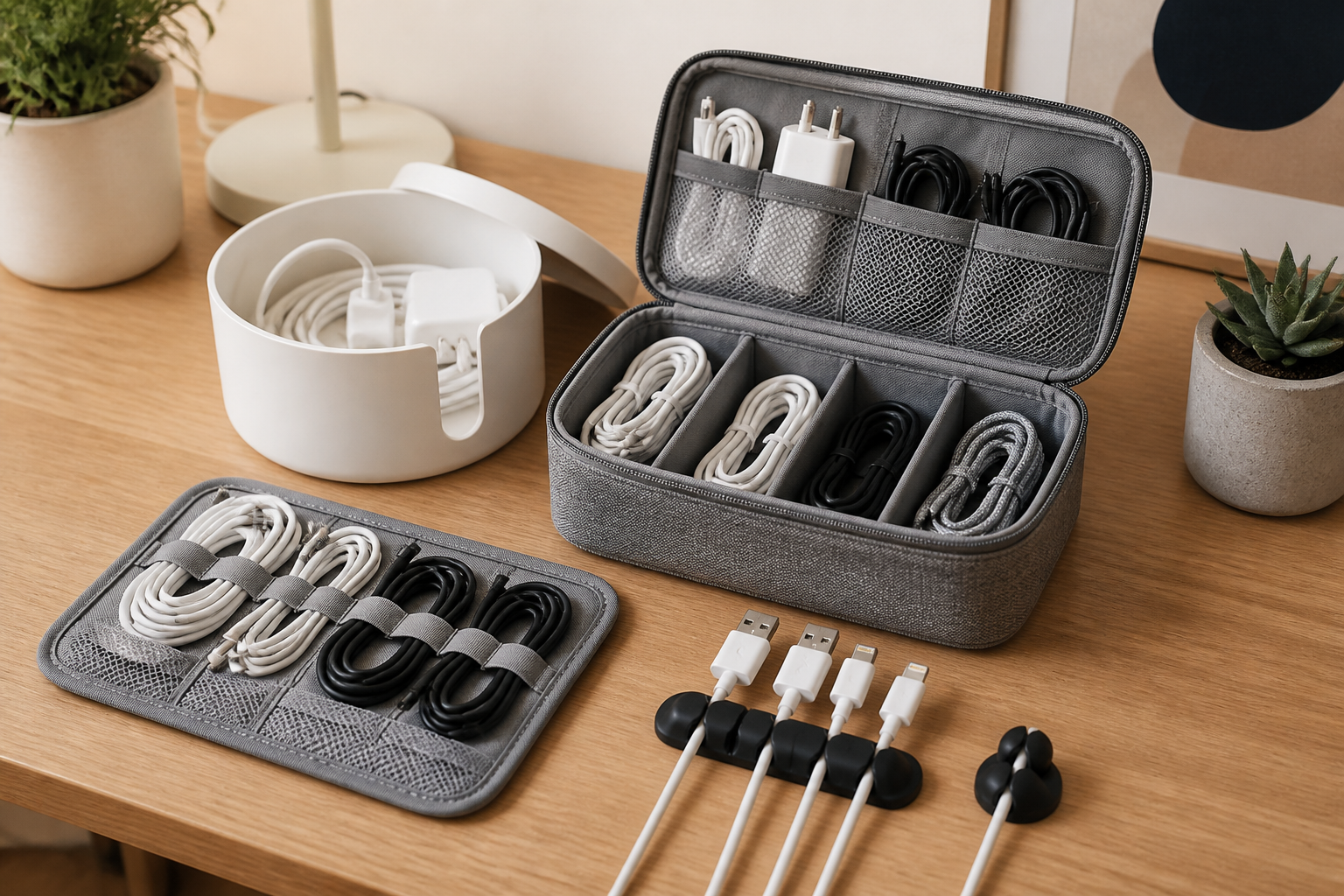
Cable clips help keep charging cables from sliding off desks, nightstands, or counters. They are useful for short-term everyday use, especially when a cable needs to stay in one place. Cord holders can also prevent charging ends from falling behind furniture where they are harder to reach.
Cable ties and reusable wraps
Reusable cable ties or hook-and-loop wraps are useful for storing spare chargers in drawers or bins. They help prevent tangles and make it easier to identify each cable at a glance. They are especially helpful for longer cords that tend to twist around other items.
Small bins and drawer dividers
For backup chargers and extra cords, shallow bins or drawer dividers are often a practical choice. They let you separate different cable types without requiring a complicated system. One section can hold USB-C cables, another can hold older charging cords, and another can hold adapters or power bricks.
Charging docks and multi-device stations
If several devices are charged in the same area, a multi-device charging station can reduce visual clutter. These setups are useful for households with more than one phone, smartwatch, or tablet. They help keep cords from spreading across the surface and can make the charging area feel more intentional.
Label Cables So You Can Identify Them Quickly
Labeling is one of the simplest ways to organize phone chargers and cables at home, especially if you have similar-looking cords. Many charging cables look nearly identical, which makes it easy to grab the wrong one in a hurry. A small label can save time and reduce confusion.
You can label cables by device name, room, or use case. For example, labels may indicate “bedroom phone,” “tablet,” “travel,” or “spare.” If several family members use similar chargers, color-coded labels or small tags can help everyone return items to the correct place.
Labeling is especially helpful for backup cables stored in drawers or boxes. Instead of digging through a pile of cords, you can identify the one you need immediately. Clear labels also make it easier to keep track of newer charging standards and older cables that may still be in use for specific devices.
Store Extra Chargers in a Way That Prevents Tangling
Not every charger needs to be out in the open. Extra cables often work better when stored out of sight, as long as they are arranged in a way that keeps them accessible and untangled.
Use a shallow drawer with dividers
A shallow drawer is often better than a deep one for cable storage because it allows items to lie flat. Drawer dividers or small boxes inside the drawer keep cords from mixing together. This method works well for spare phone chargers, wall adapters, and small accessories that you want nearby but not visible.
Try a dedicated cable box
A cable storage box can be useful if you want a neat, enclosed solution. These boxes are designed to hold cords, charging bricks, and small tech accessories together. They can help reduce visual clutter on shelves or desks while keeping the contents organized in one place.
Keep cable ends controlled
Whenever possible, secure both ends of the cable. Loose ends often catch on other items and create knots. A simple wrap or tie helps keep the cable coiled neatly, especially if it is stored for travel or as a backup.
Create a Family-Friendly System
If more than one person uses chargers in your home, organization works best when the system is easy for everyone to follow. A setup that depends on memory alone usually breaks down quickly. Instead, make the storage method obvious and simple.
Assign a specific place for each category of charger. For example, one bin can hold everyday phone cables, another can hold tablets or larger devices, and a separate pouch can store travel chargers. If certain chargers belong to specific people, label them clearly so they return to the right location after use.
It can also help to keep a small reserve of common chargers in a shared area. This reduces the chance of cords being borrowed and never returned. The more intuitive the system is, the more likely everyone will keep it in order without extra effort.
Manage Chargers by Room Instead of Piling Them Together
Some homes work better with a room-by-room strategy rather than one central storage spot. This can be especially useful if devices are used in different parts of the home. For example, bedside chargers stay in bedrooms, a backup charger can remain in a home office, and a spare cable can live in the living room for guests.
The key is to avoid scattered duplicates. If you use a room-by-room system, make each location intentional. Store only the chargers that are actually needed in that space, and keep the rest in a central backup location. This prevents every surface from becoming a permanent charging station.
Practical Buying Considerations for Cable Organizers
If you are shopping for cable organizers or charging accessories, a few practical considerations can help you choose items that fit your home better. The most useful products are often the ones that match your actual habits, not just the ones that look neat online.
Size and capacity
Consider how many cables and chargers you need to store. A small tray may work well for one or two devices, while a larger family setup may need a divided box, a multi-slot dock, or several smaller containers. Buying a storage solution that is too small often leads to overflow and clutter.
Accessibility
Choose an organizer that makes it easy to remove and replace cables without hassle. If a storage box is too tight or complicated, people may stop using it. Open bins, simple drawers, and clearly divided compartments are often easier to maintain than highly complex systems.
Compatibility with your cables
Some organizers work better with thin cables, while others handle thicker charger bricks and multiple cord types. Before buying, think about whether you store only phone charging cords or a broader mix of adapters, USB cables, and power supplies.
Material and durability
Look for materials that fit the place where the organizer will live. A soft pouch may be useful for travel, while a rigid bin may be better for a desk or shelf. If the organizer will be used daily, durable construction is usually more important than decorative style alone.
Ease of cleaning
Charging areas tend to collect dust. A simple-to-clean tray or bin can help you keep the area tidy with minimal effort. Smooth surfaces and removable inserts are often easier to manage than complicated compartments with hard-to-reach corners.
Common Mistakes to Avoid
Even a good organizing plan can become messy if it is hard to use. Avoiding a few common mistakes can help your system last longer.
- Keeping too many duplicate chargers without a clear reason to store them.
- Mixing active and backup chargers in the same pile.
- Using storage that is too deep, which makes cables hard to see and retrieve.
- Failing to label similar cords, which leads to confusion.
- Leaving chargers loose in drawers, where they can tangle quickly.
- Creating a system that is too complicated for family members or guests to follow.
Simple systems usually work better than elaborate ones. If a method takes too many steps, it is less likely to stay organized over time.
Simple Daily Habits That Keep Cables Neat
Storage solutions help, but daily habits are what keep your setup working. A few small routines can prevent clutter from returning.
- Wrap cords loosely after use instead of stuffing them into drawers.
- Return chargers to their assigned spot right away.
- Keep only the chargers you need visible in each room.
- Check cables occasionally for wear, tangles, or damaged ends.
- Re-sort the storage area every few weeks so backup cords do not pile up.
These habits take very little time, but they can make your home charging area feel much more controlled.
Who These Organization Methods May Suit
Different organizing styles suit different homes. A small tray-and-label approach may be ideal for someone living alone or sharing a compact apartment. A family with multiple phones and tablets may benefit from a charging station with compartments and a larger storage bin for backups. Frequent travelers may prefer a dedicated pouch or compact case that keeps chargers together and ready to pack.
If your main goal is visual simplicity, hidden storage may be the best choice. If your main goal is convenience, an open charging dock might work better. In many homes, the best answer is a combination of both: a visible everyday charging area and a hidden storage spot for extra cables.
Frequently Asked Questions
What is the easiest way to organize phone chargers at home?
The easiest method is usually to create one dedicated charging area and use a small bin, tray, or drawer divider for backup chargers. Keep everyday cables visible and label extras so they are easy to identify.
Should I keep all chargers in one place?
Not always. A central storage area works well for extras, but daily chargers may be easier to use if they stay in the rooms where they are most often needed. The best setup depends on how your household uses devices.
How do I stop cables from tangling in drawers?
Use reusable ties, cord wraps, or small pouches, and avoid storing loose cables together. Shallow drawers with dividers also help keep each cord separated.
How many chargers should I keep?
That depends on your devices and routines. Keep the chargers you use regularly, a reasonable number of backups, and any travel chargers you rely on. If a charger has not been used in a long time and no longer matches your devices, consider removing it.
What should I do with old or broken charging cables?
Do not keep damaged cables in your active storage area. Set them aside separately so they do not get mixed in with usable items. If you are unsure how to discard them, follow your local recycling or disposal guidelines for electronics and accessories.
Conclusion
Organizing phone chargers and cables at home becomes much easier when you keep the system simple, visible, and matched to your daily routine. Start by sorting what you have, choose one or two storage methods that fit your space, and label cables so they are easy to identify. Whether you use a charging station, drawer dividers, small bins, or cable ties, the goal is the same: make chargers easy to find and easy to put away.
A good cable organization setup does more than reduce clutter. It saves time, lowers frustration, and helps your home feel more orderly. With a clear place for active chargers and a sensible way to store extras, you can keep cords under control without adding unnecessary work to your day.


